Free Discord timestamp tool
Discord Time Converter
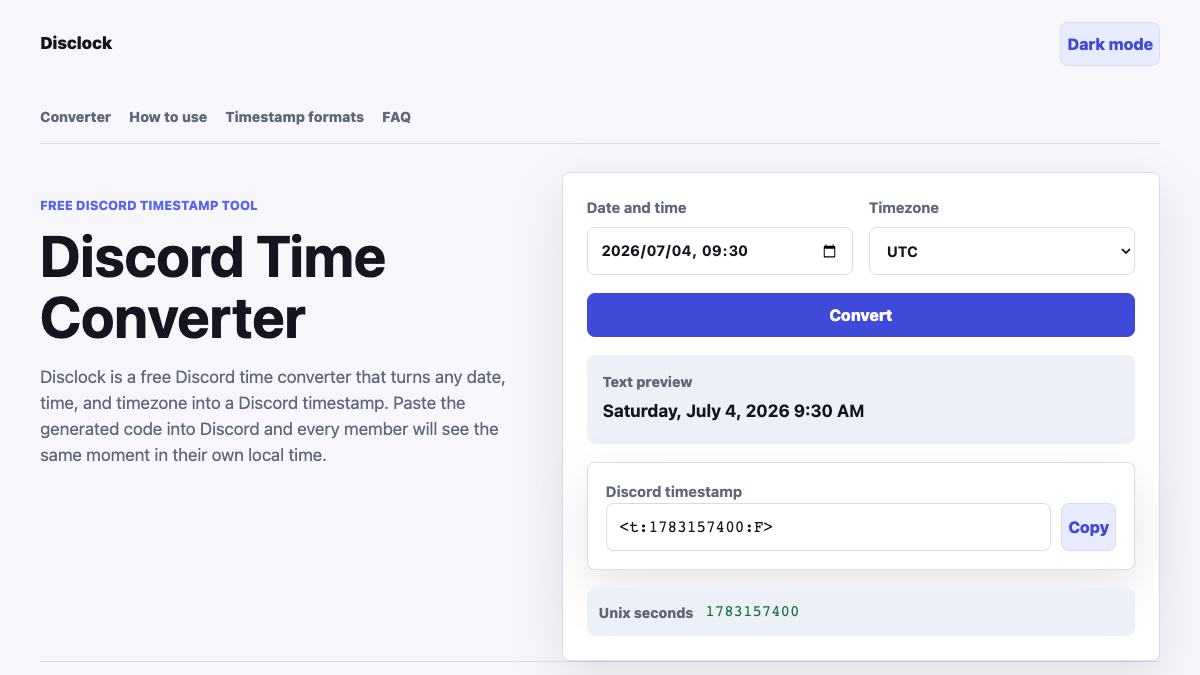
Disclock is a free Discord time converter that turns any date, time, and timezone into a Discord timestamp. Paste the generated code into Discord and every member will see the same moment in their own local time.
Three quick steps
How to Use the Discord Time Converter
Start by choosing the date and clock time for your event. The field defaults to the current moment so you can create a code immediately or move it forward to a future meeting, launch, stream, raid, class, or community event. Enter the time exactly as it appears on the organizer's schedule before selecting a timezone.
Confirm the detected timezone or choose the region where the event is actually scheduled. This matters because 8:00 PM in Los Angeles represents a different instant from 8:00 PM in London. The Discord time converter uses the selected regional timezone, including its daylight saving rules, to calculate the Unix time behind the final code.
Select Convert, check the readable preview, and copy the generated
<t:UNIX:F> value. Paste that value directly into a Discord message without
quotation marks or extra formatting. Discord will replace the markup with a
full date and time for each reader, letting everyone respond to one shared
moment instead of comparing separate timezone calculations.
One moment, every timezone
Why Discord Timestamps Prevent Timezone Confusion
A message such as "Friday at 8 PM" only makes sense when every reader knows which timezone the writer meant. In an international server, members may silently assume their own local timezone, calculate the offset incorrectly, or forget that daylight saving time changed in one country but not another. The resulting questions and missed events are not communication failures; they are a limitation of writing a fixed clock time for a global audience.
Discord timestamps solve that problem by representing an exact instant as Unix seconds. Discord reads the code and displays the corresponding local time for the person viewing the message. The organizer shares one value, while Discord handles the presentation. Members can read the announcement naturally without opening a separate timezone table or searching for the current offset between cities.
Disclock makes that system practical for people who do not work with Unix time. The Discord time converter combines a familiar calendar field, a searchable timezone list, a readable preview, and a copy action in one page. You can verify the date before posting instead of guessing whether a long number points to the intended day.
The preview also helps catch common scheduling mistakes. If the displayed weekday or clock time looks wrong, check whether you selected the event's timezone rather than your current location. Correcting the input before the announcement is faster than editing a message after members have already planned around the wrong time.
Understand the code
Discord Timestamp Format Explained
A generated value such as <t:1783157400:F> has three useful parts. The
opening t tells Discord that the markup is a timestamp. The number is the
Unix time: the count of seconds since January 1, 1970 in UTC. The final F
asks Discord to display the full weekday, date, and clock time. Disclock
calculates the number for you and preserves the punctuation Discord expects.
The tool currently generates the full-date F style because it is the most
informative option for scheduled announcements. It gives readers the weekday,
calendar date, year, and local time in one result. That makes it suitable for
events scheduled days or months ahead, where a short clock-only display could
be ambiguous.
Discord also recognizes other style letters, including short and long time, date-only displays, and relative time. Those formats use the same Unix value but change how it is presented. A Discord timestamp generator should never change the underlying moment merely because the display style changes. The timestamp remains timezone-aware for every viewer.
When you paste the code, send it through Discord before judging the final appearance. A website preview can show a readable equivalent, but only the Discord client knows the viewer's account locale and presentation rules. The generated markup is the portable result; the English preview is a final confirmation that the selected instant is sensible.
Built for shared schedules
Common Uses for Discord Scheduling
Gaming communities can publish raid starts, tournament rounds, server resets, practice sessions, and live events without maintaining separate regional schedules. Moderators can pin one announcement and trust Discord to localize it for members. The same approach works for creator premieres, livestreams, AMAs, product launches, giveaways, and community calls.
Remote teams and study groups can use a Discord time converter for standups, office hours, workshops, tutoring sessions, interviews, and deadline reminders. A localized timestamp is especially useful when participants travel or when a recurring group includes countries that change their clocks on different dates.
Event organizers can place the code in announcement channels, event details, onboarding messages, or reminder posts. If the schedule changes, generate a fresh timestamp from the revised date rather than editing the Unix number by hand. Keeping the source date and timezone explicit reduces accidental shifts by an hour or an entire day.
Website owners may also use the Embed this converter option below. It creates an iframe snippet that places Disclock inside a guide or community resource. Readers can prepare a timestamp while following the surrounding instructions, and the embedded tool continues to run without requiring an account or API key.
Fast and private
Timezone Accuracy and Browser Privacy
Disclock runs in your browser. The selected date, timezone, generated Unix value, and preview do not need to be sent to an account database. There is no sign-up step, and the Discord time converter does not ask for access to your Discord server. You can create a code, copy it, and close the page without connecting a bot or authorizing an application.
Timezone conversion uses the browser's international date and time support. Pick
a named region such as America/New_York rather than manually adding or subtracting
hours; regional zones account for applicable daylight saving rules. For important
events, verify the readable preview and confirm that the organizer's original
timezone is selected before sharing the result.
Frequently asked questions
Discord Time Converter FAQ
What is a Discord timestamp?
A Discord timestamp is special message markup containing Unix seconds and an optional display style. Discord replaces the code with a date or time adjusted to each viewer's locale and timezone.
Will everyone see the same local clock time?
No. Everyone sees the same instant, but Discord displays the clock time in each person's local timezone. That difference is the purpose of using a timestamp instead of writing a fixed time.
Which timezone should I choose?
Select the timezone where the entered event time was originally scheduled. If an organizer says 8 PM London time, enter 8 PM and choose Europe/London even when you are currently elsewhere.
Do I need a Discord bot?
No. Copy the generated markup and paste it into a normal Discord message. The Discord client recognizes the syntax without a bot, integration, API token, or server permission.
Can I use Disclock on mobile?
Yes. The page works in modern mobile browsers, and the copied timestamp can be pasted into the Discord mobile app. Check the preview before switching apps so you know the selected date is correct.
Is the Discord time converter free?
Yes. Disclock is free to use, requires no registration, and performs the conversion in your browser. You can generate and copy timestamps whenever you need to schedule something across timezones.